
CRM & Sales
Best CRM for Small Business 2025: Top Tools to Transform Your Customer Management
August 18, 2025
The best CRM for small business operations has become more critical than ever as the market evolves rapidly. With the CRM market projected to reach $262.74 billion by 2032 according to Fortune Business Insights, it’s clear that businesses worldwide are recognizing the essential role of organized customer management in driving growth and sustainability.
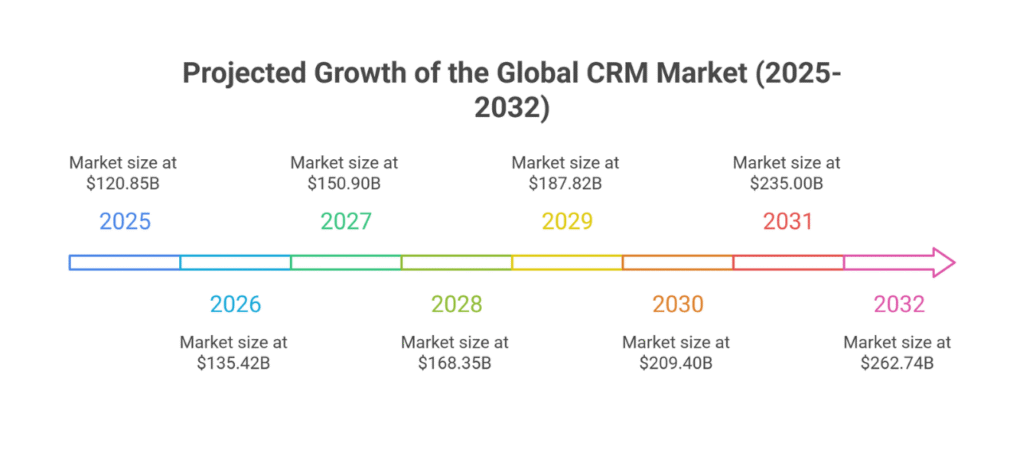
For small business owners across America, this growth represents both an unprecedented opportunity and a significant challenge. While enterprise companies have embraced CRM technology for years, 65% of small businesses are still in their first five years of CRM adoption. The question isn’t whether you need a CRM—it’s which solution will actually help your business thrive in an increasingly competitive marketplace.
Why CRM Software Matters for Small Businesses in 2025
Small businesses across diverse industries—from home service contractors to e-commerce retailers, professional consultants to local restaurants—face unique challenges that make effective customer management crucial. Today’s small businesses compete not just with local competitors, but with online retailers and national chains that have sophisticated customer tracking systems.
Consider the service provider managing hundreds of leads while trying to maintain relationships with existing customers, or the retail store attempting to build customer loyalty in an era of endless options. Without organized systems, these businesses often struggle with:
- Lost leads falling through the cracks
- Inconsistent follow-up with potential customers
- Difficulty tracking which marketing efforts actually generate sales
- Time wasted on manual data entry instead of serving customers
- Inability to identify their most valuable customers
A well-implemented small business CRM system addresses these pain points by centralizing customer information, automating routine tasks, and providing insights that drive better business decisions.
How to Choose the Best CRM for Small Business Needs
With hundreds of CRM options available, selecting the right one requires careful consideration of your specific needs and constraints. Here are the essential factors every small business should evaluate:
Ease of use: Your team needs to actually use the system daily Cost structure: Monthly fees, per-user pricing, and hidden costs for essential features Automation capabilities: Time-saving features for follow-ups, reminders, and data entry Integration options: Compatibility with your existing tools and website Mobile accessibility: Critical for field workers and busy owners Customer support: Responsive help when you need it most Scalability: Room to grow without switching systems
The key is finding a solution that fits your current needs while providing room for growth. Many small businesses make the mistake of choosing based solely on price, only to outgrow their system within months.
Top Small Business CRM Tools to Consider in 2025
HubSpot – Best All-in-One Free Option
HubSpot remains a popular choice for startups and budget-conscious businesses, offering a robust free tier that includes contact management, deal tracking, and basic email marketing.
Pros: Genuinely free starter option, excellent learning resources, strong integration ecosystem
Cons: Advanced features require paid plans, can become expensive as you scale
Best for: New businesses testing CRM waters without upfront investment
Zoho CRM – Best Value for Growing Teams
Zoho CRM provides excellent value for small teams ready to invest in comprehensive customer management. Service providers appreciate its workflow automation and mobile app functionality.
Pros: Affordable pricing, extensive customization, good mobile experience
Cons: Learning curve for advanced features, occasional interface complexity
Best for: Growing businesses that need advanced features without enterprise pricing
Salesforce Essentials – Best for Scalability
While traditionally enterprise-focused, Salesforce Essentials offers small businesses access to powerful CRM capabilities with room for significant growth.
Pros: Incredibly robust feature set, extensive third-party integrations, proven scalability
Cons: Higher learning curve, pricing increases with advanced needs
Best for: Businesses planning aggressive growth or complex sales processes
Freshsales – Best for Automation & Simplicity
Freshsales excels at making CRM automation accessible to small teams without dedicated IT support. Built-in calling and intuitive setup make it particularly appealing to service-based businesses.
Pros: User-friendly interface, strong automation features, integrated communication tools
Cons: Limited customization compared to competitors, fewer third-party integrations
Best for: Small teams prioritizing ease of use and built-in communication features
Pipedrive – Best for Visual Sales Pipelines
Pipedrive’s visual approach to sales pipeline management resonates with teams that think in stages and want clear visibility into their sales process.
Pros: Intuitive visual interface, strong pipeline management, good reporting
Cons: Limited marketing features, basic customer service tools
Best for: Sales-focused teams that prioritize deal progression visibility
CRM Comparison Table
| CRM Tool | Best For | Pros | Cons |
|---|---|---|---|
| HubSpot | Free all-in-one starter CRM | Free tier, great learning resources, strong integrations | Advanced features require paid plans, pricing grows with scale |
| Zoho CRM | Growing teams on a budget | Affordable, customizable, good mobile app | Steeper learning curve, occasional interface complexity |
| Salesforce Essentials | Scalability & long-term growth | Robust features, vast integrations, enterprise-ready | Higher learning curve, pricing increases quickly |
| Freshsales | Automation & ease of use | User-friendly, strong automation, built-in calling & comms | Limited customization, fewer integrations |
| Pipedrive | Visual sales pipeline management | Intuitive interface, clear pipeline visibility, solid reporting | Limited marketing features, basic customer support tools |
These top CRM tools each bring unique strengths—choose the one that best matches your business stage and growth goals.
Beyond Traditional CRM: The All-in-One Business Solution Revolution
Here’s where the conversation gets interesting. While the CRM tools above excel at customer relationship management, they represent just one piece of what small businesses actually need to succeed in 2025.
Think about your daily reality as a business owner. You need to:
- Maintain a professional website that attracts customers
- Manage and respond to customer inquiries promptly
- Schedule appointments without endless phone tag
- Send professional invoices and track payments
- Maintain an active social media presence
- Collect and showcase customer reviews
- Generate detailed analytics to understand what’s working
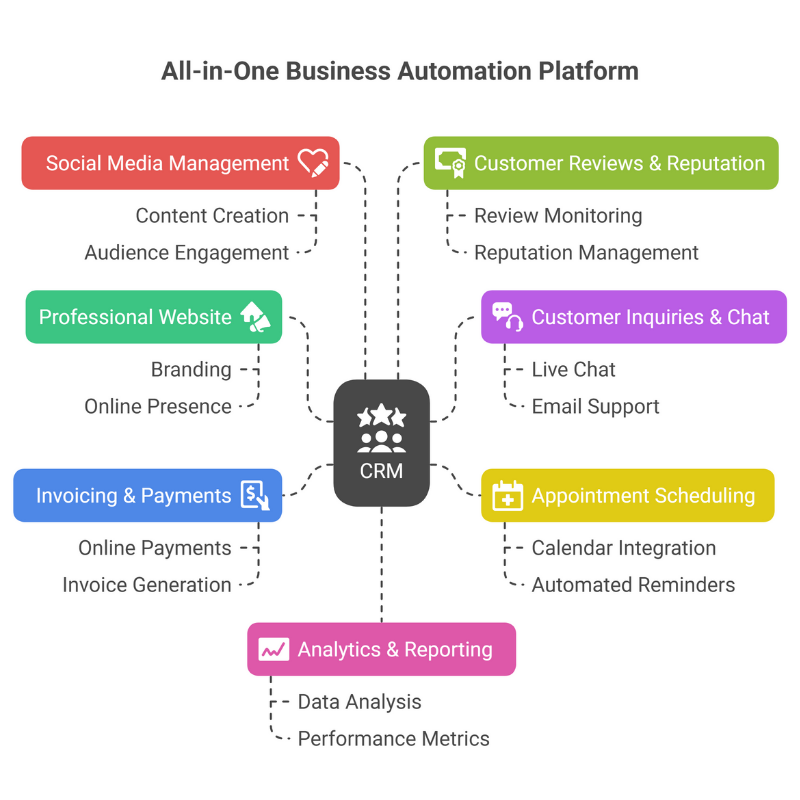
Traditional CRM systems handle customer data beautifully, but they leave you juggling multiple additional tools for website management, social media scheduling, invoicing, and review management. This fragmented approach often costs more and creates more complexity than small business owners can reasonably manage.
The most forward-thinking small businesses in 2025 are moving beyond traditional CRM limitations toward comprehensive business automation platforms that integrate all these essential functions into one cohesive system.
National CRM Trends & Small Business Adoption Patterns
Small businesses across America are increasingly recognizing the competitive advantage that organized customer management provides. Recent trends show:
Industry-Specific Adoption Patterns:
- Construction and service contractors are prioritizing mobile-friendly systems for field work
- E-commerce businesses focus on integration with inventory management and shipping platforms
- Professional services emphasize appointment scheduling and automated follow-up capabilities
- Manufacturing companies require robust contact management and order tracking systems
Common Implementation Challenges: Small businesses often struggle with data migration from spreadsheets or basic contact lists, employee adoption resistance, and integration with existing websites and tools.
Success Stories: The most successful CRM implementations across various industries share common characteristics: they start simple, focus on one key workflow first, and prioritize user training over feature complexity.
Common Mistakes Small Businesses Make When Choosing CRM Software
Learning from others’ experiences can save you significant time and money. Here are the most frequent CRM selection mistakes we see among small businesses:
Choosing Based Solely on Price: The cheapest option often lacks essential features, forcing expensive upgrades or system changes later.
Ignoring Mobile Requirements: Many business owners work from multiple locations and need full mobile functionality, not just basic apps.
Underestimating Training Needs: Even user-friendly systems require proper onboarding. Plan time for team training and gradual implementation.
Overlooking Integration Requirements: Your CRM should work seamlessly with your website, email marketing, accounting software, and other essential tools.
Focusing on Features Over Workflow: The most feature-rich system is worthless if it doesn’t match how your team actually works with customers.
Skipping the Trial Period: Every CRM works differently. Test with real data and workflows before committing to annual contracts.
The Complete Business Automation Alternative
For small businesses ready to move beyond traditional CRM limitations, comprehensive business automation platforms offer a compelling alternative. Instead of managing separate tools for customer relationships, website maintenance, social media, invoicing, and review management, these integrated solutions provide everything in one platform.
This approach offers several advantages:
Simplified Management: One login, one billing relationship, one support contact
Better Data Integration: Customer information flows seamlessly between website, CRM, invoicing, and marketing
Cost Efficiency: Often less expensive than combining multiple specialized tools
Faster Implementation: No complex integrations between different systems
Unified Reporting: See complete customer journey from website visit to final payment
For small businesses that need more than customer management—those requiring professional websites, automated marketing, streamlined invoicing, and reputation management—this integrated approach often provides better results with less complexity.
Final Recommendations for Small Business CRM Selection
The best CRM for small business success in 2025 depends on your specific needs, growth plans, and operational style. Traditional CRM tools excel when customer relationship management is your primary concern, but many small businesses benefit more from comprehensive business automation platforms that address multiple operational needs simultaneously.
Before making your decision:
- Start with a clear assessment of all your business management needs, not just customer relationships
- Take advantage of free trials to test systems with your actual data and workflows
- Consider total cost of ownership, including additional tools you’ll need for complete business management
- Plan for growth by choosing systems that can scale with your business
- Prioritize user adoption by selecting tools your team will actually use consistently
The investment in proper customer and business management systems pays dividends through improved efficiency, better customer relationships, and sustainable growth.
Ready to streamline your business operations beyond traditional CRM limitations? Explore LeadProspecting AI’s comprehensive business automation platform and discover how an all-in-one solution can transform your business management approach.
Frequently Asked Questions About Small Business CRM
What is the best CRM for small business owners? The best CRM depends on your specific needs. HubSpot offers an excellent free option for beginners, while Zoho CRM provides great value for growing teams. However, many small businesses find that comprehensive business automation platforms better address their complete operational needs.
How much does CRM software for small businesses typically cost? CRM pricing varies widely, from free options like HubSpot’s basic plan to $100+ per user monthly for advanced systems. Most small businesses spend $25-75 per user monthly for robust CRM functionality.
Is HubSpot really free for small businesses? Yes, HubSpot offers a genuinely free CRM tier that includes contact management, deal tracking, and basic email marketing. However, advanced features like automation and detailed reporting require paid plans.
Can a CRM help my small business increase sales? Absolutely. CRMs help businesses track customer preferences, automate follow-up communications, manage loyalty programs, and identify top customers for targeted promotions.
Which small business CRM system works best on mobile? Zoho CRM, Freshsales, and Pipedrive all offer strong mobile experiences. The key is choosing a system designed for mobile use, not just offering a mobile app as an afterthought.
Do I need technical skills to set up a CRM? Most modern CRM systems are designed for non-technical users. However, proper setup, data migration, and team training require time and attention to detail, regardless of technical complexity.
How do I migrate my customer data into a new CRM? Most CRM providers offer data import tools and migration assistance. Start by cleaning your existing data, then use CSV import functions or professional migration services for complex transitions.
What’s the difference between small business CRM and enterprise CRM? Small business CRMs prioritize ease of use, affordability, and quick implementation. Enterprise CRMs focus on advanced customization, complex workflows, and integration with multiple business systems.
Can a CRM integrate with my existing website? Most modern CRMs offer website integration through forms, chat widgets, and tracking codes. However, comprehensive business automation platforms provide deeper website integration since they often include website creation and management tools.
How long does it take to see results after implementing a CRM? Most businesses see initial organization benefits within 2-4 weeks. Measurable improvements in sales processes and customer relationships typically become apparent within 2-3 months of consistent use.