
CRM & Sales
From One-Time Jobs to Predictable Revenue: How Automation for Service Businesses Builds Consistent Growth
November 11, 2025
TL;DR
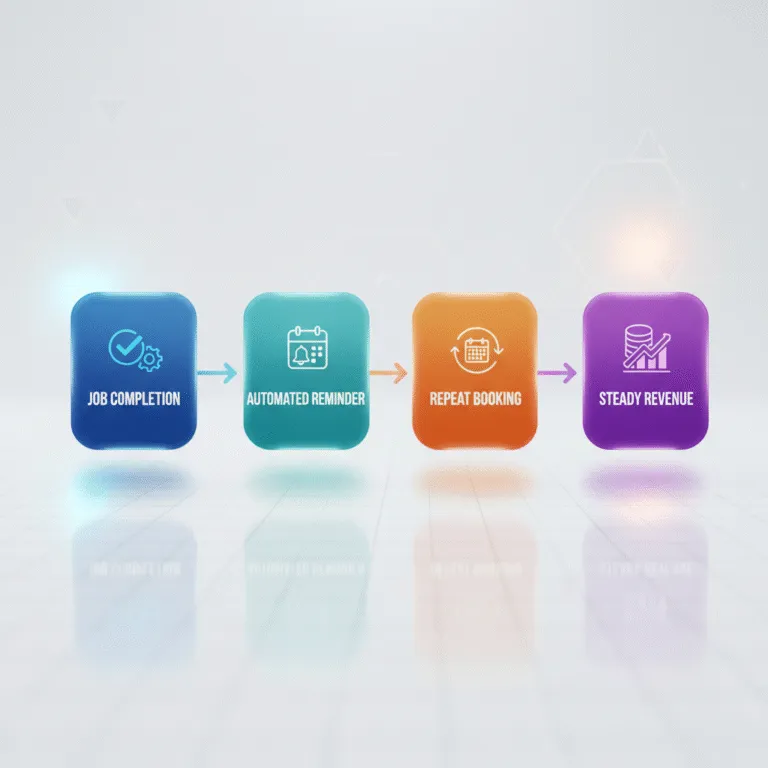
Most service businesses lose revenue because they treat every job like a one-off project. With automation for service businesses, you can turn seasonal jobs into steady, predictable income. Learn how scheduling, follow-ups, and payment workflows create a recurring service model that keeps your calendar — and cash flow — consistent all year round.
You finished a job. Customer loved the work. Left a five-star review. Paid on time. Everything went perfectly.
Then… nothing. Six months pass. A year. You never hear from them again. Not because they didn’t need you—they just forgot you existed. And you forgot to follow up because you were busy chasing the next job.
This is the revenue trap that kills service businesses: treating every customer like a one-time transaction instead of a recurring relationship.
Here’s the brutal math: acquiring a new customer costs 5-7 times more than keeping an existing one. Customer acquisition costs have increased 60% over the past five years, making it harder and more expensive to fill your pipeline with strangers. Meanwhile, increasing customer retention by just 5% can boost profits by 25-95%.
Yet most service businesses in Twin Falls and beyond still operate the same way: finish a job, send an invoice, hope the customer remembers you next time they need help.
There’s a better way. Automation for service businesses turns one-time jobs into predictable, recurring revenue streams. It’s not about working more—it’s about working smarter by building systems that keep customers coming back without you having to chase them.
And the businesses that figure this out? They’re growing 2.5 times faster than competitors still stuck in the one-job-at-a-time cycle.
The Problem with One-Time Jobs (And Why It Hurts Service Businesses)
Let’s talk about what “normal” looks like for most service businesses.
A landscaper in Twin Falls has a packed schedule from April through October. Then winter hits, and the calendar goes blank. Revenue drops. Crews get laid off. The owner spends December and January stressed about making payroll and hoping spring comes early.
A plumber finishes a water heater installation. The customer is thrilled. But that plumber never reaches back out to schedule a filter change, check the expansion tank, or offer an annual maintenance plan. Twelve months later, the customer calls a different plumber—whoever shows up first in Google—because they don’t remember who installed it in the first place.
An HVAC company spends thousands on Facebook ads every month to generate new leads. They book the jobs, do great work, and then… start over. Every single month, they’re paying to find brand new customers instead of nurturing the hundreds they’ve already served.
This isn’t just inefficient—it’s financially devastating.
According to service business automation research, companies lose 20-30% of annual revenue due to poor follow-up and inconsistent re-engagement. That’s not a rounding error. That’s the difference between a profitable year and a struggling one.
The problem isn’t the quality of your work. It’s the lack of systems that keep customers engaged after the job is done. Without service business automation, you’re constantly in reactive mode: answering calls, chasing leads, scrambling to fill the schedule. There’s no rhythm. No predictability. Just chaos disguised as hustle.
And here’s the kicker: your customers actually want to hear from you again. They hired you once because they trusted you. But life is busy. They forget to schedule maintenance. They lose your business card. They get distracted by a dozen other priorities. If you’re not staying in front of them, someone else will.
The solution isn’t working harder or spending more on advertising. It’s building automated workflows that turn every completed job into the foundation for the next one.
How Automation for Service Businesses Creates Predictable Revenue Streams
Imagine this: A customer hires you to clean their carpets. You do a great job. They pay. You leave. Two months later, they get an automated text: “Hi Sarah, it’s been 60 days since your last carpet cleaning. Spring allergens are picking up—would you like to schedule a refresh? Reply YES to book.”
Sarah replies yes. Your system automatically sends her three available time slots. She picks one. The appointment goes on your calendar. You show up. She pays. Sixty days later, the cycle repeats.
You didn’t make a single sales call. You didn’t send a manual follow-up email. You didn’t even think about Sarah until your calendar reminded you she was booked. The system handled everything.
That’s automation for service businesses in action. And it works across every trade.
Here’s how different automated workflows create predictable revenue:
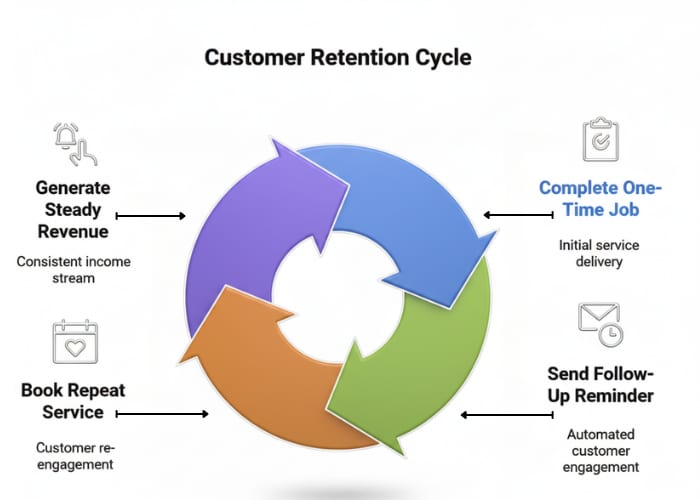
Follow-Up Sequences: Automated Reminders for Seasonal Tune-Ups
Most service work has a natural cadence. HVAC systems need maintenance twice a year. Lawns need fertilizing every season. Pest control is quarterly. Gutters should be cleaned in spring and fall.
Your customers know this—sort of. But they’re not tracking it. You are. Or at least, your automation system is.
With automated follow-up sequences, you can set triggers based on service type and completion date:
- HVAC tune-up completed in April? Automatically send a reminder in September for fall maintenance.
- Roof inspection done in May? Schedule a pre-winter check-in email in October.
- Plumbing service call finished? Send a “maintenance tips” email 30 days later with an option to schedule an annual inspection.
A Twin Falls HVAC company that implemented automated spring and fall maintenance reminders saw a 35% increase in repeat bookings within the first year. They didn’t change their service. They just stopped relying on customers to remember when maintenance was due.
Smart Scheduling: Automatically Offering “Next Service” Booking
The best time to book the next appointment is right after you finish the current one. Your customer is happy. Your work is fresh in their mind. They trust you. But if you’re juggling tools, paperwork, and the next job, it’s easy to forget to ask.
Smart scheduling automation solves this. Before you even leave the job site, your system sends a follow-up message:
“Glad we could help with your furnace today! To keep it running efficiently, we recommend scheduling your fall tune-up now. Book here: [link]”
Or for subscription-style services:
“Thanks for choosing us for your lawn care. Want to lock in monthly service for the season? Save 15% by booking now.”
This isn’t pushy sales—it’s professional service. You’re offering convenience and value while the relationship is warm.
Payment and Invoicing Automation: Recurring Billing for Maintenance Plans
Recurring revenue doesn’t just happen from repeat bookings—it happens when you build maintenance plans with predictable monthly or quarterly billing.
Think about how Netflix works. You don’t decide each month whether to keep paying. You subscribe once, and it auto-renews until you cancel. Service businesses can (and should) use the same model.
A pest control company offers a quarterly service plan: $99 every three months, automatically billed. Customers sign up once. Payments process automatically. Appointments get scheduled in advance. The business has predictable cash flow, and the customer has peace of mind.
A pool cleaning service in Twin Falls moved to monthly auto-billing for seasonal maintenance. Instead of chasing down payments after every visit, they now have consistent revenue from May through September—and customers love the convenience.
Automated invoicing also improves cash flow. Instead of waiting 30-60 days for customers to pay, recurring billing gets you paid on time, every time.
Upsell Triggers: Workflows That Suggest Add-On Services
Not every job is the same, but many services naturally pair together. A customer who hires you for gutter cleaning probably needs roof inspection. Someone calling for furnace repair might also need duct cleaning. A homeowner booking carpet cleaning may want upholstery done too.
Automated upsell triggers identify these opportunities and suggest them at the right moment:
- During booking: “Would you like to add gutter cleaning to your roof inspection? Save $50 when bundled.”
- After service completion: “We noticed your air ducts haven’t been serviced in over two years. Schedule cleaning now and get 20% off.”
- Seasonal triggers: “Winter’s coming—want to add pipe insulation to your maintenance plan?”
These aren’t random pitches. They’re timely, relevant suggestions based on customer history and service patterns. And because they’re automated, they happen consistently—not just when you remember to mention them.
The result? Higher average job value, better customer outcomes, and more revenue per relationship.
LeadProspecting AI clients report measurable increases in monthly recurring bookings by implementing these exact workflows—turning one-time projects into ongoing revenue streams.
Predictable Revenue Automation: Turning Repeat Clients into Recurring Income
There’s a critical difference between repeat customers and predictable income.
A repeat customer is someone who hires you more than once. That’s good. But it’s still reactive. They call when they need you. You hope they remember you. There’s no certainty.
Predictable revenue automation is different. It’s proactive, systematic, and built into your business model. It connects CRM data, client history, and workflow triggers to nurture relationships long-term—so you’re not just hoping for repeat business, you’re engineering it.
Here’s how it works across different service industries:
Pest Control: A customer signs up for quarterly visits. The system automatically schedules the next appointment, sends reminders a week before, and processes payment 24 hours after each service. The customer never has to think about it. You never have to chase them. Revenue is predictable, month after month.
Cleaning Services: A client books a one-time deep clean. They love it. Two weeks later, they receive an automated email: “Want to keep your home this clean? Subscribe to bi-weekly service and save 20%.” They sign up. Every two weeks, the system sends a reminder, confirms the appointment, and auto-bills their card. Predictable income.
HVAC Maintenance Plans: After completing a furnace repair, the system triggers an offer: “Protect your investment with our annual maintenance plan—two tune-ups per year for $299, billed in two easy payments.” The customer enrolls. Spring and fall appointments are pre-scheduled. Payments process automatically. Cash flow becomes predictable.
The numbers back this up. According to recent market research, businesses with recurring contracts grow 2.5 times faster than those relying on one-off sales. The subscription economy is projected to reach $1.5 trillion by 2025, and 75% of direct-to-consumer businesses now offer subscription models—including service companies.
In Twin Falls, weather changes often drive service seasonality. Predictable revenue automation helps even that out by pre-booking maintenance before busy months hit. A local roofing company started offering annual inspection memberships—$199 per year for two inspections and priority storm response. They signed up 80 customers in the first quarter, creating $15,920 in guaranteed revenue before the busy season even started.
That’s the power of shifting from transactional work to relationship-based recurring income.
Real-World Use Cases: Service Business Automation That Works
Let’s break down exactly how different trades are using automation to build recurring revenue:
Plumbers: Post-Job Follow-Ups That Drive Repeat Business
A plumber installs a new water heater. Great work. Happy customer. But water heaters need maintenance—filter changes, expansion tank checks, anode rod inspections. Most homeowners have no idea when these things should happen.
With automation, the plumber sets up a 6-month follow-up:
“Hi John, it’s been 6 months since we installed your water heater. Time for a quick maintenance check to keep it running efficiently. Book here: [link]”
Sixty percent of customers book the appointment. The plumber generates additional revenue, the customer avoids costly breakdowns, and the relationship strengthens.
Roofers: Seasonal Maintenance Inspections
A roofing company completes a shingle replacement in July. In October, the system automatically sends:
“Winter’s approaching—want to schedule a pre-season roof inspection? We’ll check for any issues before snow and ice cause damage.”
This isn’t a sales pitch. It’s proactive service. And it works. Customers appreciate the reminder, and the roofer books jobs during what would otherwise be a slow season.
HVAC: Predictive Maintenance Triggers
An HVAC company tracks the age and service history of every system they touch. When a furnace hits 12 years old (the typical lifespan), the system flags it and triggers an automated message:
“Your furnace is approaching the end of its expected lifespan. Want a free assessment to see if repair or replacement makes more sense?”
The result? Preemptive quotes instead of emergency breakdowns. Customers get better service. The HVAC company fills its schedule with planned work instead of reactive chaos.
Cleaners & Landscapers: Subscription-Style Recurring Billing
A cleaning service offers three tiers: monthly deep clean ($199), bi-weekly maintenance ($149), and weekly service ($99 per visit). Customers choose a plan, provide payment info once, and the system handles everything else—scheduling, reminders, billing.
The result? Predictable monthly income. The owner knows exactly how much revenue is coming in next month, next quarter, and next year. No guessing. No scrambling to fill the calendar. Just steady growth.
A landscaping company in Twin Falls implemented a similar model for seasonal lawn care. Customers subscribe in March for weekly mowing, monthly fertilization, and fall cleanup. Payments auto-process. Jobs get scheduled in advance. The business doubled its recurring revenue in one season.
One LeadProspecting AI client—a local service contractor—increased monthly recurring bookings by 40% through automated quote follow-ups and maintenance reminders. They didn’t hire more people or spend more on ads. They just stopped letting existing customers slip away.
Building a Recurring Service Business Without Losing the Human Touch
Here’s the concern most service business owners have about automation: “Won’t my customers think I’m just a robot sending generic messages?”
Fair question. And the answer is: only if you automate badly.
Good automation enhances relationships. It doesn’t replace them.
Think about it this way: when your dentist’s office sends you a reminder about your six-month checkup, do you think, “Wow, how impersonal”? No. You think, “Oh yeah, I need to schedule that. Thanks for the reminder.”
That’s what smart service business automation does. It handles the logistics—reminders, scheduling, payments—so you can focus on the human parts: showing up on time, doing great work, and building trust.
Here’s how to keep automation personal:
Use merge tags for names and service history:
Instead of: “Time to schedule your next service!”
Try: “Hi Sarah, it’s been 60 days since we cleaned your carpets. Ready to schedule your next refresh?”
One sentence. Completely automated. Feels personal because it references her by name and her specific service.
Customize messages by service type:
A text about furnace maintenance should sound different from one about gutter cleaning. Tailor the tone and content to what makes sense for each job.
Let customers respond directly:
Don’t send one-way broadcasts. Use conversational SMS where customers can reply with questions, and your team (or AI assistant) responds in real-time. It feels like texting a friend, not receiving a marketing blast.
Include personality in your templates:
Write like you talk. If you’d say “Hey” instead of “Greetings,” use “Hey.” If you’d add “Hope you’re staying warm this winter!” at the beginning of a message, include it. Automation should sound like you, just more consistent.
In smaller markets like Twin Falls, relationship-based service is everything. Customers value trust, responsiveness, and personal connection. Automation should enhance those values—not strip them away.
As one local contractor put it: “Automation should save time, not strip personality.”
The goal isn’t to become a faceless corporation. It’s to build systems that let you deliver the same great service to 100 customers that you used to deliver to 10—without burning out or forgetting anyone.
How to Start Automating Your Service Business (Without Breaking Your Routine)
Ready to build predictable revenue? Here’s how to start without overhauling your entire operation overnight.
Step 1: Audit Your Process — Where Do You Lose Leads or Follow-Ups?
Take 30 minutes and map out your current workflow from lead to completed job. Where do things fall apart?
- Do you forget to follow up with estimates?
- Do customers ghost you after the first conversation?
- Do you complete jobs but never reach back out?
- Do you have past customers who should’ve booked again but didn’t?
Identify the biggest leak. That’s where you start.
For most service businesses, the biggest gap is post-job follow-up. You finish the work, send an invoice, and move on. That’s where 30-40% of potential recurring revenue disappears.
Step 2: Automate One Workflow at a Time
Don’t try to automate everything at once. Pick one workflow and nail it before moving to the next.
Start with the easiest, highest-impact automation:
Option 1: Post-job follow-up
After every completed job, send an automated “thank you” message within 24 hours. Include a review request and a link to book future service.
Option 2: Seasonal reminders
If your work is seasonal (HVAC, landscaping, roofing), set up automated reminders 30 days before the busy season starts.
Option 3: Estimate follow-up
If someone requests a quote but doesn’t book, trigger a 3-day follow-up sequence: Day 1 (thank you + reminder), Day 3 (case study or testimonial), Day 7 (limited-time offer).
Pick one. Set it up. Let it run for 30 days. Measure results. Then add the next automation.
Step 3: Integrate Your CRM
You can’t automate what you don’t track. If customer data is scattered across spreadsheets, sticky notes, and text threads, automation won’t work.
Move everything into one CRM that syncs contacts, invoices, and communication history. Platforms like LeadProspecting AI integrate with your phone system, website forms, and payment processors—so every interaction is captured automatically.
This isn’t just about automation. It’s about not losing track of people who’ve already shown interest in your business.
Step 4: Measure Your Results
Track three simple metrics:
- Repeat booking rate: What percentage of customers hire you more than once?
- Average time between jobs: How long does it take customers to come back?
- Revenue from existing vs. new customers: How much of your income comes from people you’ve already served?
Before automation, most service businesses get 20-30% of revenue from repeat customers. After implementing smart workflows, that number should climb to 50-60% within six months.
A Twin Falls cleaning company started by automating follow-ups after one-time deep cleans. Within three months, their repeat booking rate doubled—from 18% to 41%. They didn’t change the service. They just stopped letting customers forget about them.
For service businesses ready to go all-in, LeadProspecting AI partners with FieldServ AI to create a complete growth system. LeadProspecting AI automates lead capture, follow-ups, and customer engagement. FieldServ AI handles job scheduling, dispatch, payments, and field operations. Together, they turn one-time jobs into predictable, recurring revenue—without adding complexity to your day.
And if you want hands-off setup with expert guidance, the Founders Club offers done-for-you automation, priority support, and custom workflows designed specifically for contractors and service professionals.
Ready to Turn One-Off Jobs into Predictable Revenue?
Here’s the bottom line: every completed job is an opportunity. Not just for that one paycheck, but for a long-term relationship that generates steady income month after month, year after year.
But without automation for service businesses, that opportunity disappears. Customers move on. Competitors swoop in. You’re left starting over every week, chasing new leads instead of nurturing the relationships you’ve already built.
The businesses that win aren’t the ones working harder—they’re the ones working smarter. They build systems that keep customers engaged, automate follow-ups, and create predictable revenue streams that smooth out seasonal swings and fill the calendar year-round.
For service businesses in Twin Falls and across the Magic Valley, this isn’t optional anymore. Customer acquisition costs are rising. Customers expect consistent communication. And competitors who adopt automation are already pulling ahead.
The question isn’t whether you need automation. It’s whether you’ll implement it before your competition does.
Explore how LeadProspecting AI helps service businesses automate follow-ups, build recurring revenue, and grow without the chaos—all from one dashboard built specifically for contractors and local service pros.
Stop treating every job like a one-time transaction. Start building relationships that pay you back—again and again.
Frequently Asked Questions About Automation for Service Businesses
1. What’s the easiest way to start automation for service businesses?
Start with post-job follow-ups. After every completed job, send an automated “thank you” message within 24 hours that includes a review request and an option to schedule future service. This one workflow can increase repeat bookings by 30-40% with minimal setup.
2. How can automation help small teams save time without hiring more staff?
Automation handles repetitive tasks—sending reminders, scheduling appointments, following up with estimates, processing payments. This frees your team to focus on delivering service and building relationships instead of chasing administrative tasks. Many small businesses report saving 10-15 hours per week after implementing basic automation.
3. Is predictable revenue automation affordable for small local companies?
Yes. Most automation tools cost $100-300 per month—far less than hiring an admin or marketing person. And because automation increases repeat business and reduces customer acquisition costs, it typically pays for itself within 60-90 days through higher revenue and better cash flow.
4. How does service business automation integrate with my current CRM?
Modern automation platforms like LeadProspecting AI integrate with most CRMs, payment processors, scheduling tools, and communication systems. Data syncs automatically, so you’re not manually entering information or switching between apps. Setup usually takes a few hours, and most platforms offer support to help you get started.
5. What workflows should a recurring service business automate first?
Focus on three high-impact workflows: (1) Post-job follow-ups with booking links, (2) Seasonal maintenance reminders based on service type, and (3) Automated estimate follow-ups for leads who don’t book immediately. These three workflows address the biggest revenue leaks in most service businesses.
6. Can automation send personalized messages that don’t feel robotic?
Absolutely. Good automation uses merge tags to include customer names, service history, and custom details. The messages sound like you wrote them personally—because you did—automation just handles the sending and timing. Write in your own voice, use conversational language, and customize templates by service type.
7. What’s the best automation setup for HVAC or plumbing services in Twin Falls?
For HVAC and plumbing, focus on maintenance reminders. Set up automated follow-ups 6-12 months after major installations (furnaces, water heaters, AC units) to offer tune-ups or inspections. Also automate seasonal reminders—spring AC checks and fall furnace maintenance. These workflows keep you top-of-mind and generate recurring revenue year-round.
8. How does automation improve customer retention in a local service area?
Automation ensures no customer gets forgotten. You stay top-of-mind with timely, helpful reminders without manually tracking every relationship. In smaller markets like Twin Falls, consistent communication builds trust and loyalty—customers remember who stays in touch and prioritizes their needs.
9. Is it possible to track ROI from automation in real time?
Yes. Most automation platforms provide dashboards showing open rates, response rates, bookings generated, and revenue tracked to specific campaigns. You can see exactly which workflows are driving repeat business and adjust accordingly. Many businesses see measurable ROI within 30-60 days.
10. How can Twin Falls businesses use automation to reduce seasonal slowdowns?
Use automation to pre-book maintenance during off-seasons. For example, landscapers can send fall cleanup reminders before winter. Roofers can offer winter inspection specials. HVAC companies can schedule furnace tune-ups in August before the fall rush. By automating these offers 30-60 days in advance, you fill slow periods with predictable work instead of waiting for emergencies.